PRODUCT PREVIEWThis site showcases Orbit’s local development build. Screenshots and replays use example content. The app, accounts, uploads and live AI are not public yet.Availability →

Turn conversations into finished, checkable work.

Orbit is an AI workspace where every answer links to the exact passage it came from. Draft beside the chat, let an agent work in steps you can see, and keep project memory that only changes when you say so.

Local development preview shown below. Public access is coming soon.

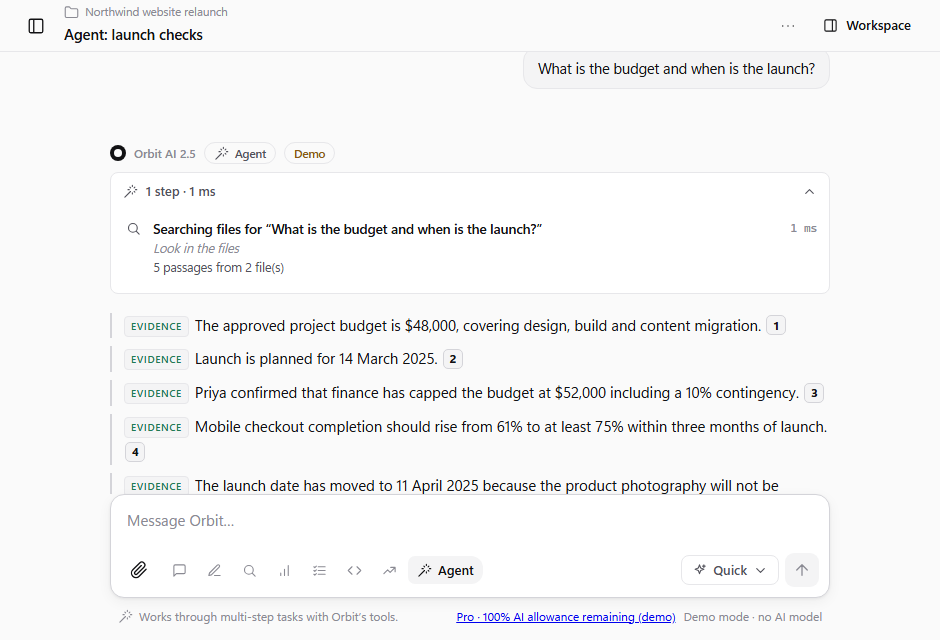
Orbit answering “What is the budget and when is the launch?” from two files. Each claim is labelled Evidence and carries a numbered citation, and a box notes that the sources disagree on the budget.
Research mode in the real app, in demo mode. The two budget figures come from two different files, and Orbit says so.
24local tools the agent can use, every step shown
8work modes that change the actual workflow
100%of displayed quotations checked against your files
48automated evaluation cases guarding quality

How Orbit works

Five things it does differently, each shown as it appears in the app.

01

Answers you can check

Ask a question about your files. Orbit retrieves passages, asks for exact quotations, then verifies every quote word-for-word against the file. Claims are labelled Evidence, Inference, Uncertain or Not verified, and clicking a citation opens the passage with the quote highlighted.

02

A workspace beside the conversation

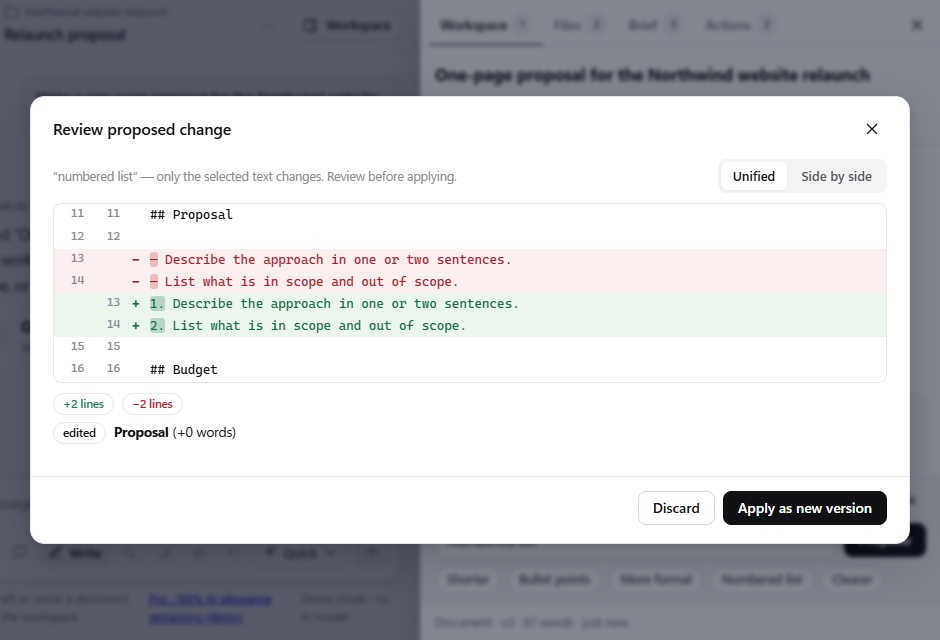
Develop documents, tables and code next to the chat. Select a section, ask for a change, and review a diff. Only that text changes. Every save is a version you can compare, restore or download as Word, Markdown, CSV or code.

03

An agent that shows its work

Give the agent a multi-step task. It searches, reads, calculates and compares with 24 local tools, and every step appears as it happens. It can create new documents and drafts, but edits to existing work are proposals you apply.

04

Markets research, paper only

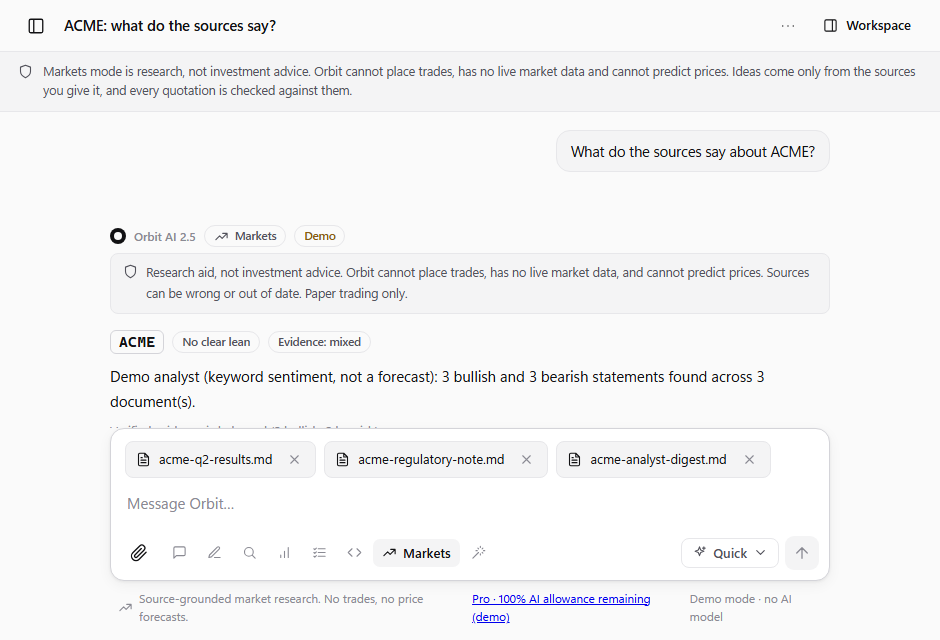
Feed it news and filings. You get verified bullish and bearish evidence, an evidence strength computed by Orbit, scenarios, and what the sources cannot tell you. Orbit downgrades a stance the evidence does not support, cannot place trades, and cannot predict prices.

05

Projects that remember what you approved

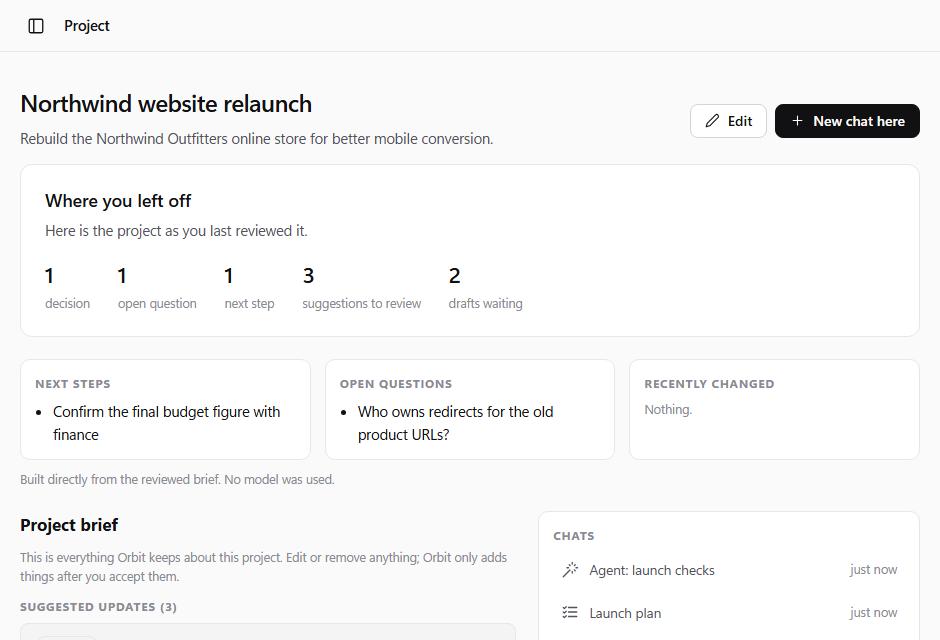
Each project keeps a brief of goals, decisions, questions and next steps. It changes only when you accept a suggestion. Come back after a week and the “where you left off” page is built from what you reviewed, with no model call.
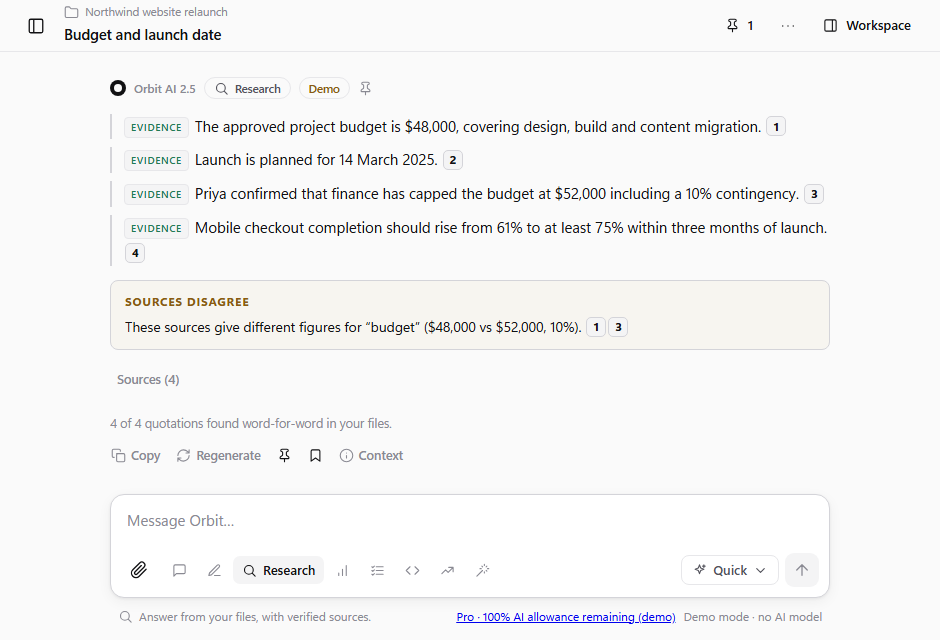
Research answer with labelled claims and numbered citations
Research: every claim labelled, every quote checked.
A proposed change to one section of a document shown as a side-by-side diff
Workspace: review the change before it is applied.
An agent run showing its first step and a proposed edit alongside the document
Agent: each step listed as it happens.
Markets mode with a research-only notice, bullish and bearish evidence, and an evidence rating of mixed
Markets: research and paper trading, with the limits stated up front.
A project page with a where-you-left-off summary and brief items awaiting review
Projects: memory you review before it is saved.

The rest of the toolkit

Eight work modes
Research retrieves and verifies. Write drafts into a document with versions. Analyse computes numbers itself. Plan produces tasks you review. Switch mid-conversation without losing context.
Speed and cost you can see
Orbit Swift and Orbit Depth, with honest trade-offs, token estimates before sending, a confirmation for anything large, and a usage meter that does not surprise you.
Numbers with their working shown
Attach a spreadsheet and Orbit calculates the statistics itself, listing every formula. The model interprets figures; it never does the arithmetic.
Compare anything
Two files or two versions: changed sections, changed figures, missing sections, open questions, and same-label-different-value contradictions.
Review-first actions
Tasks, follow-ups and notes become local drafts. Each shows what would happen and what data would leave. Approval is explicit, and no document can approve anything for you.
Keyboard first
Search everything, slash commands in the message box, mode shortcuts, stop with Esc, edit your last message with the up arrow.
Temporary chats, described honestly
Not saved to history, search or project memory. We never call that “private” or “zero retention”: while live AI is on, the text still goes to the model provider.
Reusable workflows with review points
Prepare a proposal, review a report, turn meeting notes into an action plan. Start them yourself, check and edit every step, and the result lands as a versioned document. Nothing runs in the background.

Orbit’s direction and roadmap

No “coming soon” buttons. If a capability is limited or missing, it is listed here in plain words.

In the local development preview

  • Persistent chats, edit, regenerate, undo. Stopping a reply keeps what was written.
  • Work modes. Chat, Write, Research, Analyse, Plan, Code, Markets and Agent each follow a different workflow.
  • Verified answers from your files. Quotes are checked word-for-word; clicking a citation opens the passage.
  • Workspace documents. Versions, section-level revision with a reviewable diff, undo, Word, Markdown, CSV and code download.
  • Project briefs. Goals, decisions, questions and next steps that change only when you accept a suggestion.
  • Local drafts. Tasks and notes you review and approve. Nothing leaves your computer.
  • Agent with tools. Multi-step work with 24 local tools, every step shown; it proposes rather than changes.
  • Comparison and table calculations. Differences, open questions and visible formulas: structural checks, not understanding.
  • Manual workflows. Start them yourself; review every step.
  • Markets research and paper trading. Source-grounded analysis, a simulated ledger, a backtester and a risk calculator.

What comes next

Development roadmap — intentions, not release dates.

  • More document formats. PDF reading and page-linked citations, then broader document support.
  • Richer analysis. Charts with visible source numbers and editable tables.
  • Broader research and creation. Web research, voice and image workflows, introduced as they are ready.
  • Isolated code execution. A dedicated environment for running and checking generated code, subject to security validation.
  • Connected projects. Portable project exports and future NovaSoft One and Sites integrations, with explicit access controls.
  • Background workflows. Scheduled work with review, spending controls and clear approval steps.

Pricing

Prices are in Australian dollars (A$) per month. Every plan has one shared monthly allowance: Orbit Depth mode and multi-step agent runs use it faster than Orbit Swift replies.

Proposed launch plans — not available to purchase. Prices and allowances below describe the current plan proposal and may change before launch. No sign-up, checkout or AI usage is available on this website.

Plan contents may change before launch. Allowances reset monthly (UTC). Compare plans in detail

Questions

How do the citations work, and can they be wrong?

Orbit asks the model for claims with exact quotations, then checks each quotation word-for-word against your file. A quotation that is not found is shown as “Not verified”, never as evidence. A verified citation proves the words are in the source. It does not prove the source is correct, so review important facts.

Does Orbit place trades or give investment advice?

No. Markets mode is research and simulation. It analyses the sources you provide, computes evidence strength itself, and records paper trades on your own computer. It has no brokerage connection, no live market data and no price forecasts, and it is not a licensed adviser.

How do Orbit’s AI options differ?

Orbit Swift is designed for fast, everyday help. Orbit Depth is intended for more advanced reasoning and involved tasks, using more of the shared allowance. The underlying third-party AI services may change. Orbit is the assistant and workspace, not a claim that NovaSoft trained the underlying models. Live AI is not available on this public preview.

What gets sent to the AI provider?

Each reply sends recent messages, the few most relevant excerpts from your files (never whole files), project brief items and your saved preferences. Older messages are summarised to save cost, and the originals stay available to you.

Where is my data stored?

See Privacy and data. In short: saved work is stored in a database you control, temporary chats are kept only in server memory, and you can export or delete everything from Settings.

Can Orbit run code for me?

No. Code mode writes and explains code, but nothing is executed because no isolated sandbox is available. The calculator is a fixed arithmetic parser, not a programming language.

What happens when I use up my allowance?

Orbit warns you as it runs low and refuses requests that would pass your limit rather than charging you unexpectedly. The allowance resets each month.

How do subscriptions work?

Subscriptions are not available on this website. The proposed launch plans are Free, Starter at A$9.90/month and Pro at A$19.90/month. Pricing, inclusions and billing terms will be confirmed before paid access launches. There is no checkout here.

More detail

A closer look today. The working app comes next.

Explore the local preview through its screenshots and examples. Public accounts, uploads and live AI are not available yet.

Paid plans are not live yet

All plans are coming soon. No account creation or checkout is available on this marketing website.

Coming soon